Integrations
Each agent, tracker and tool Skribly works with, and exactly what works with each. These tables come from the apps' own support lists.
Agents
Skribly Agent runs 13 agents. It looks for them in PATH and in common install locations, and it also finds Claude Code installed only as an editor extension. You can add your own commands in Settings.
agent-skills installs for seven agents. Windsurf is an editor, so Skribly Agent does not run it in a pane, but agent-skills supports it.
Scrollable table
| Agent | Panes and states | Chat and pipelines | Resume after restart | MCP switch | Browser tab | agent-skills |
|---|---|---|---|---|---|---|
| Claude Code | Yes | Yes | Yes | Yes | Yes | Yes |
| Codex CLI | Yes | Yes | Yes | Yes | Yes | Yes |
| Cursor Agent | Yes | Yes | Yes | Yes | Yes | Yes |
| Gemini CLI | Yes | Yes | No | Yes | Yes | Yes |
| OpenCode | Yes | Yes | Yes | No | No | Yes |
| Copilot CLI | Yes | Yes | Yes | No | No | Yes |
| Aider | Yes | Yes | No | No | No | No |
| Amp | Yes | Yes | No | No | No | No |
| Factory Droid | Yes | Yes | Yes | No | No | No |
| Qwen Code | Yes | Yes | Yes | No | No | No |
| Goose | Yes | Yes | Yes | No | No | No |
| Crush | Yes | Yes | Yes | No | No | No |
| Kimi CLI | Yes | No | Yes | No | No | No |
| Windsurf | No | No | No | No | No | Yes |
Kimi CLI works in the terminal only, so it has no chat mode and no pipelines. Agents without native resume start as a fresh shell in the same directory after a restart, with a hint showing how to start them again.
Commands and install lines
Settings shows the same commands, and each one can be copied with a click. After installing a new agent, choose Detect again.
Scrollable table
| Agent | Command | Install |
|---|---|---|
| Claude Code | claude | npm install -g @anthropic-ai/claude-code |
| Codex CLI | codex | npm install -g @openai/codex |
| Cursor Agent | cursor-agent | curl https://cursor.com/install -fsS | bash |
| Gemini CLI | gemini | npm install -g @google/gemini-cli |
| OpenCode | opencode | npm install -g opencode-ai |
| Copilot CLI | copilot | npm install -g @github/copilot |
| Aider | aider | python -m pip install aider-install && aider-install |
| Amp | amp | npm install -g @ampcode/cli |
| Factory Droid | droid | curl -fsSL https://app.factory.ai/cli | sh |
| Qwen Code | qwen | npm install -g @qwen-code/qwen-code |
| Goose | goose | curl -fsSL https://github.com/block/goose/releases/download/stable/download_cli.sh | bash |
| Crush | crush | brew install charmbracelet/tap/crush |
| Kimi CLI | kimi | npm install -g @moonshot-ai/kimi-code |
Where skills go
Every agent reads native skill folders. Six of them share .agents/skills, so one copy serves them all, and Claude Code reads .claude/skills. Some agents also get a short command that points to the skill.
Scrollable table
| Agent | Target | Folder in the project | Call a skill |
|---|---|---|---|
| Claude Code | claude | .claude/skills/<name>/ | /task 123 |
| Codex CLI | codex | .agents/skills/<name>/ | $task 123 |
| Cursor | cursor | .agents/skills/<name>/ | /task 123 |
| Gemini CLI | gemini | .agents/skills/<name>/ + .gemini/commands/<name>.toml | /task 123 |
| OpenCode | opencode | .agents/skills/<name>/ + .opencode/commands/<name>.md | /task 123 |
| Windsurf | windsurf | .agents/skills/<name>/ + .windsurf/workflows/<name>.md | /task 123, @task |
| GitHub Copilot | copilot | .agents/skills/<name>/ | /task 123 |
Older agent versions can use --format rules, which writes each agent's classic rule format.
Trackers
Both Skribly Agent and the task skill read these trackers. Tasks assigned to you appear in one list in the app, and every tracker gives you the task description and comments.
Scrollable table
| Tracker | Task key | Comment | Status | Assign | Create | Search | Log time | Time activities | Types | Priority | Labels |
|---|---|---|---|---|---|---|---|---|---|---|---|
| Skribly Tracker | AGENT-12 | Yes | Yes | Yes | Yes | Yes | Yes | Yes | Yes | Yes | Yes |
| Jira | PROJ-123 | Yes | Yes | Yes | Yes | Yes | Yes | No | Yes | Yes | Yes |
| Redmine | 2047 | Yes | Yes | Yes | Yes | Yes | Yes | Yes | Yes | Yes | No |
| GitHub | owner/repo#12 | Yes | Yes | Yes | Yes | Yes | No | No | No | No | Yes |
| GitLab | group/project#34 | Yes | Yes | Yes | Yes | Yes | Yes | No | Yes | No | Yes |
| Linear | ENG-56 | Yes | Yes | Yes | Yes | Yes | No | No | No | Yes | Yes |
The agent-skills command line is read-only by default. It only posts a comment when you ask for it with --post --yes.
Connecting each tracker
Scrollable table
| Tracker | Address | Token | Permissions |
|---|---|---|---|
| Skribly Tracker | Address of your instance | Profile, then API tokens | A read-write token, so comments and status changes work |
| Jira Cloud | https://your-team.atlassian.net and your account e-mail | id.atlassian.com, Security, API tokens | Read issues in the projects you can see |
| Jira Server or Data Center | Server address, with the e-mail left empty | Profile, Personal Access Tokens | Read issues in the projects you can see |
| Redmine | Home page address, without /issues | My account, API access key | An administrator must enable the REST API |
| GitHub | Empty for github.com, /api/v3 address for Enterprise | Settings, Developer settings, Personal access tokens | Fine-grained: Issues, read-only |
| GitLab | Empty for gitlab.com, or your own instance | Preferences, Access tokens | read_api scope |
| Linear | Can stay empty | Settings, Security & access, Personal API keys | An account that can see the teams with tasks |
Git hosts
Sign in to GitHub, GitLab, Bitbucket, Gitea or Azure DevOps, and the dashboard shows your real commit activity. Pull requests go through GitHub CLI, and all other git work uses your own git.
Editors and themes
Skribly Agent reads themes from VS Code, Cursor, Windsurf and VSCodium, or downloads them from Open VSX. It can open a file in any of these editors, and it can install an extension into them for you.
The Cursor tab manages project rules in .cursor/rules and Cursor's MCP servers, and it has an Open in Cursor action.
MCP, plugins and browser tools
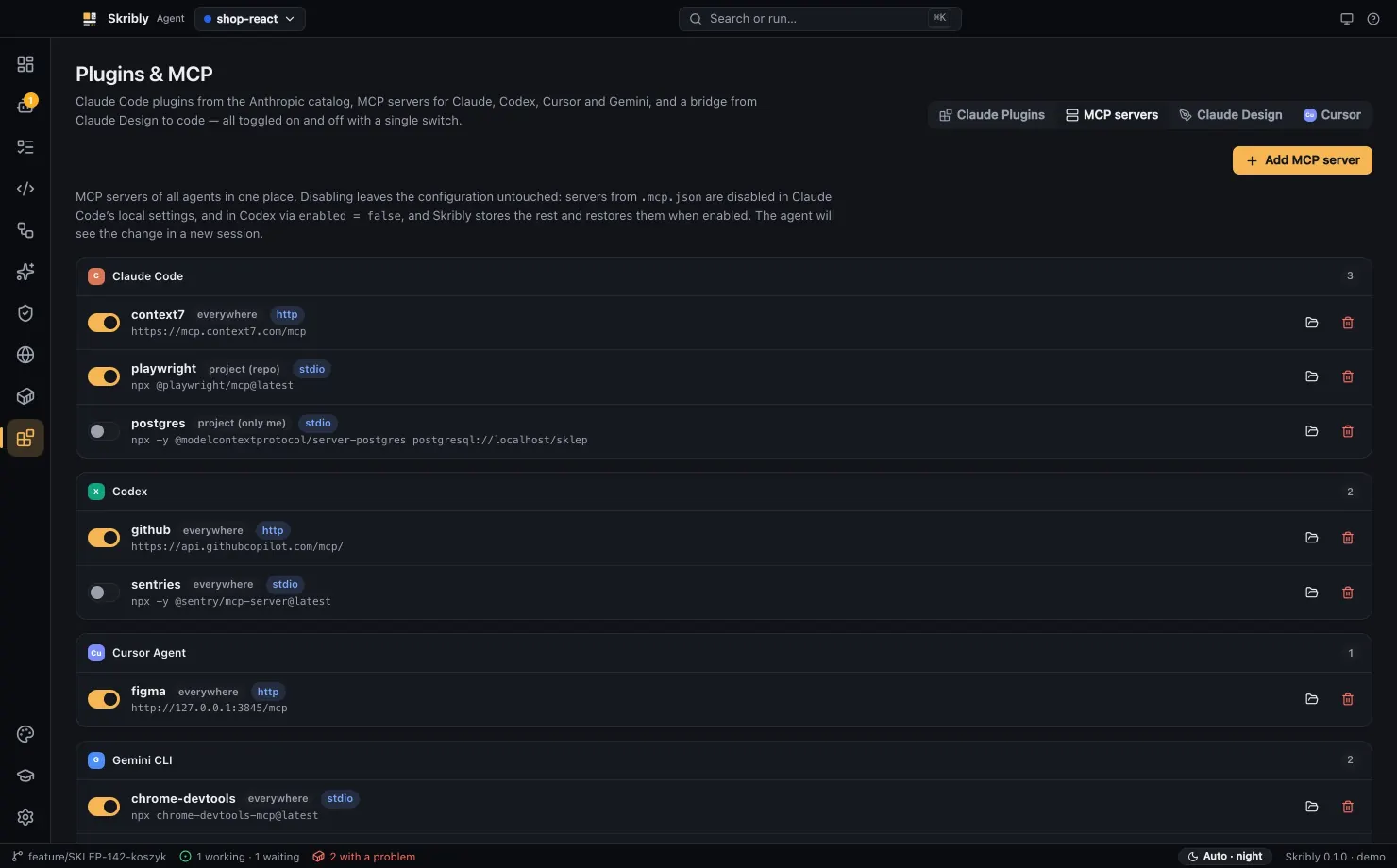
- MCP servers of Claude Code, Codex, Cursor and Gemini CLI appear in one list. Add a server to several agents at once, or switch one off without losing its configuration.
- Claude Code plugins from the Anthropic catalogue can be installed everywhere, for a project or just for you.
chrome-devtools-mcpand Playwright MCP can control the app's browser over the Chrome DevTools Protocol.- Claude Design packages can go to Claude Code, Codex CLI, Cursor Agent, Gemini CLI or Droid to be built in your project.
skribly mcpis an MCP server of its own, so agents can start and read other agents.
Audit and test tools
- OSV.dev provides known vulnerabilities for npm, PyPI and Composer packages. Only package names and versions are sent.
- axe-core checks accessibility in Skribly Agent and in the
wcag-auditskill. - PageSpeed Insights or local Lighthouse measure Core Web Vitals in the
pagespeedskill. - Playwright, k6, autocannon, Locust, Schemathesis, Dredd, Hurl and newman are used by the test skills.
- hadolint and actionlint add to the
dockerandci-setupskills when they are installed.
Docker
Skribly Agent uses your docker command to list containers, run actions, read logs and work with compose files. A watcher in the background reports containers that crash or restart in a loop.
Keep reading
- See all features
Everything Skribly does, grouped by job.
- Read the Skribly Agent guide
From installation to your first commit.
- Compare with terminals
What the app adds and what it does not.